
Wingback is now a LiteLLM guardrail: keep your gateway, add runtime security
Already running LiteLLM? Wingback is now a first-class guardrail there. See every model call, enforce policy, and contain one agent without leaving your gateway.
Wingback now works with LiteLLM. If LiteLLM is already the gateway your apps and agents use to reach models, you can put Wingback’s runtime security on that path. You do not have to replace LiteLLM, or point every application at a new gateway.
Wingback is available as a guardrail in LiteLLM’s proxy docs. LiteLLM describes it as a first-class guardrail provider: it inspects prompts and responses on every call, and can block or change content before a request reaches a model, or before a response reaches a client.
The rest of this post is for teams who already run LiteLLM and want to know what changes for them.
Who this is for
LiteLLM is an open-source AI gateway that a lot of platform teams already run. Applications send traffic to one place, and that gateway routes the calls to 100+ model providers, with virtual keys, budgets, and spend tracking. The project has more than 60,000 stars on GitHub. The product itself is documented at docs.litellm.ai, including a clear overview of the LiteLLM AI Gateway.
If that is already in production for you, this integration is meant for that setup. Many teams started with a single application behind LiteLLM and now have a fleet of agents on the same gateway. The open question is no longer “can we reach the models?” It is “what are they sending, and can we stop the one that goes wrong without taking everyone else offline?”
LiteLLM already does the hard work of routing, keys, and cost. Wingback adds the security layer on that same path: visibility, detection, policy, and containment. You keep the gateway your engineers already know.
This split is usually why projects like this stall. Security wants a new choke point in front of the models. Platform does not want to move every client to a second gateway. Here the choke point you already have is the one we use. LiteLLM stays where applications already point. Security gets inspection and control on that traffic.
If you do not run LiteLLM, this post is not the starting point. If you do, you can add Wingback without a re-architecture.
If you already run LiteLLM and want to see this on your traffic, request a demo. For setup, use LiteLLM’s Wingback guardrail guide.
What you get
Your applications keep talking to LiteLLM the way they do today. LiteLLM keeps routing to the providers you already configured. Wingback watches that path.
You can see every model call that goes through the gateway, prompts and responses, in one place. Until you have that, policy is a guess. With it, a security review can start from actual traffic rather than a spreadsheet of which teams think they have access.
On those calls, Wingback looks for prompt injection and jailbreak attempts, personal or other sensitive data in prompts and responses, and content that breaks the policies you set. Those are the checks LiteLLM documents for the guardrail. You can also apply the protection policies you already maintain in Wingback.
You do not have to start by blocking traffic. Run in monitor mode first: scan and log, leave the request alone. When the findings look right, switch to enforce mode, where a policy can block a request or change content before it is sent or returned. That order is deliberate. Teams who jump straight to blocking usually spend the next week explaining false positives.
When one agent in a fleet starts to misbehave, you can contain that agent and leave the rest running on LiteLLM. A hold is more useful than taking the gateway down, or rotating a credential that other agents still need. We wrote about that problem at more length in One rogue agent in a shared-credential fleet.
You also get a record of what was seen and what was stopped. Once model traffic is in production, that is the audit trail security and compliance reviews actually ask for.
How it sits next to LiteLLM
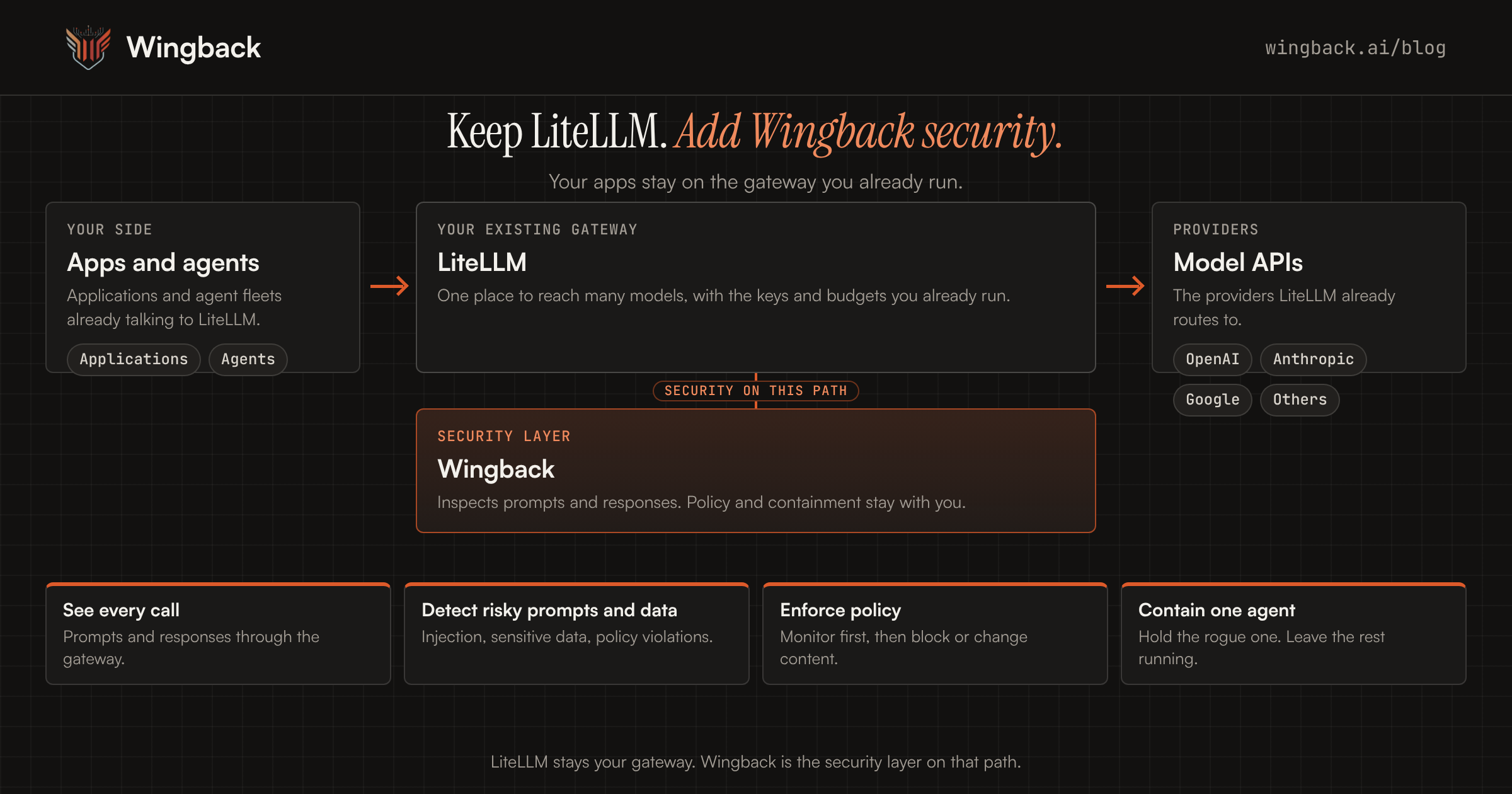
The diagram above is the whole picture, on purpose. Your apps and agents still call LiteLLM. LiteLLM still talks to OpenAI, Anthropic, Google, and the other providers you already use. Wingback sits on that path as the security layer. It does not become your new gateway.
You can add the guardrail from LiteLLM’s Admin UI, or follow the official guide. Either way, LiteLLM stays in the middle of the request, which is where your teams already operate it.
Nothing in this integration asks you to change how applications authenticate to LiteLLM, or which models you already exposed. The security work happens on the traffic that is already flowing.
How to get started
Start with LiteLLM’s Wingback guardrail documentation. That page is the setup guide. If you would rather walk through it on a deployment like yours, request a demo.
On a demo we usually start in monitor mode, on traffic that already goes through LiteLLM. Then we show what enforcement looks like on a single bad call, and how a hold lands on one agent without disturbing the others. If your security and platform teams want to be in the same session, that is a good use of the time.
Sources and further reading
- Wingback guardrails in the LiteLLM proxy docs. The official page for this integration, including how LiteLLM describes the guardrail and how to add it.
- LiteLLM documentation, and the LiteLLM AI Gateway overview, for what the gateway already does with keys, budgets, and routing.
- The BerriAI/litellm repository on GitHub.
- One rogue agent in a shared-credential fleet: contain it, kill it, keep the rest running.
Talk with Wingback
If your teams already run LiteLLM, we would like to show you this on your traffic.
Request a demo. Keep LiteLLM’s Wingback guardrail guide open for setup.
LiteLLM is an open-source project of Berri AI. This integration is built and supported by Wingback Security.
Keep reading
- BlogOur Baseten connector: cover the models you host, not just the ones you rentWingback now discovers, guards, and red-teams the models you serve on Baseten, with the same runtime coverage your frontier APIs…
- BlogOne rogue agent in a shared-credential fleet: contain it, kill it, keep the rest runningWhen a fleet of AI agents shares credentials, you can contain the one that goes rogue, kill it if you need to, and keep every…
- BlogNVIDIA OpenShell and Wingback: securing agents at runtimeOpenShell governs what an AI agent can access. Wingback, connected through the OpenShell supervisor, checks what it sends to…