
NVIDIA OpenShell and Wingback: securing agents at runtime
Wingback Security · 6 min read
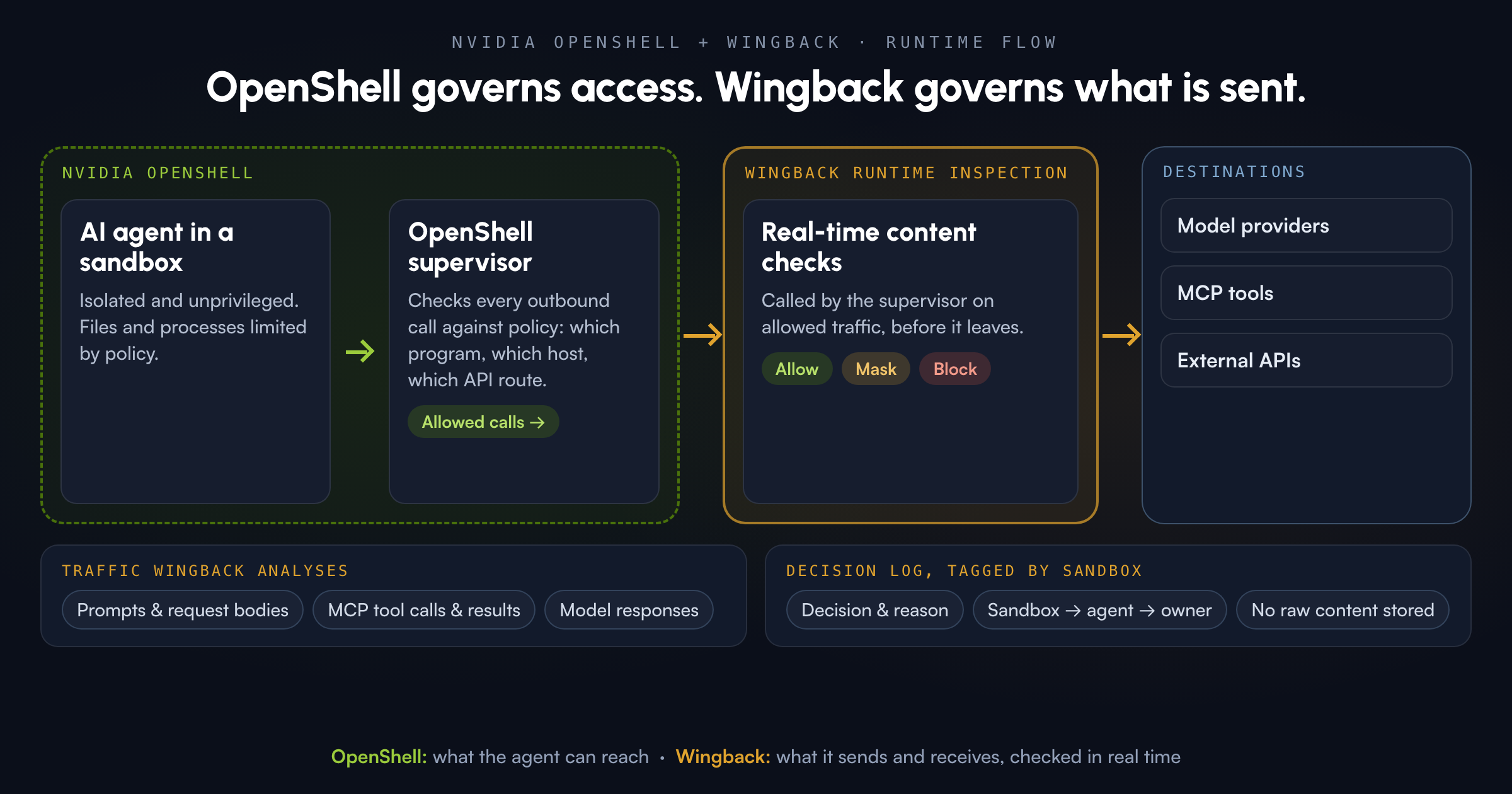
NVIDIA OpenShell gives every AI agent its own sandbox and enforces a declarative policy for what it can touch: files, processes and network destinations. Wingback now connects to OpenShell through its supervisor and adds real-time checks on what the agent sends and receives. Prompts and request bodies going to model providers are scanned for secrets and personal data. MCP tool calls and their results are checked, and so are model responses. Each decision is logged against the sandbox and agent it came from.
Put simply: OpenShell governs what an agent can access. Wingback governs what goes over those connections.
What OpenShell gets right
NVIDIA launched OpenShell at GTC in March 2026 as part of its Agent Toolkit. It’s an open-source runtime under Apache 2.0, and NVIDIA’s launch post on the technical blog explains the thinking behind it well. It’s the main source for this note.
The key design choice is out-of-process enforcement. Coding agents ship with their own guardrails, but those live inside the agent. OpenShell moves the control point outside, into the environment, so a confused or compromised agent can’t talk its way around the rules. NVIDIA compares it to browser tabs: each session is isolated, and the runtime checks permissions before anything runs.
From the OpenShell documentation, a few strengths stand out:
- Real isolation. Each agent runs unprivileged in its own sandbox. Kernel controls limit which files it can read or write and which system calls it can make.
- Deny-by-default networking. Every outbound connection is denied unless a policy rule allows that program to reach that host. Rules can narrow access to specific methods and paths, and they can be updated on a running sandbox.
- Credentials kept out of reach. The agent never sees real keys. OpenShell adds them only to requests headed for approved endpoints.
- Reviewed policy changes. The architecture docs describe formal checks that flag risky new access, like a new host with credentials, so a person approves it first. Every allow and deny is auditable.
- One policy layer everywhere. Any model and any agent harness, across cloud, on-prem, edge and air-gapped setups.
NVIDIA also built OpenShell to be extended. Its policy has a section for network middleware: extra inspection that runs on traffic the network rules have already allowed. NVIDIA says it is working with security vendors on OpenShell compatibility. That extension point is where Wingback connects.
Where Wingback sits next to OpenShell
The diagram at the top shows the flow from left to right.
- The agent runs inside its OpenShell sandbox.
- Every outbound call goes through the OpenShell supervisor. This is the trusted process that sits outside the agent and enforces policy. It decides whether this program may reach this host and API route.
- When the supervisor allows a call, it hands the call to Wingback as part of OpenShell’s own middleware chain. Wingback inspects the content and returns a decision: allow, mask or block.
- Only then does the call reach the model provider, MCP server or external API.
So the supervisor is the entry point. Wingback doesn’t sit inside the agent, and the agent can’t tell whether a check ran. It doesn’t need a separate proxy that agents might route around either. It runs where OpenShell already controls egress, as a step the supervisor calls on allowed traffic.
Sandboxes are linked to owners, too. When OpenShell creates a sandbox, Wingback maps it to an account and agent in your workspace, and traffic from that sandbox isn’t allowed until the mapping exists. Anything it can’t match goes to an admin to assign. That keeps the record clean when one team runs dozens of sandboxes, which is the same problem we covered in Shadow AI inventory before governance.
What Wingback checks at runtime
Once traffic reaches Wingback through the supervisor, these are the parts it looks at:
- Prompts and request bodies. Text bound for model providers and APIs is scanned for secrets such as cloud keys and tokens, and for personal data such as names, card numbers and addresses. Depending on policy, Wingback masks the value and lets the request continue, or it blocks the request.
- MCP tool calls and results. Tool listings, tool-call inputs and tool outputs are checked, so a tampered tool description or a result that leaks data turns up as a finding. For more on why this matters, see MCP tool poisoning needs runtime defense.
- Model responses. What comes back from providers is checked before the agent acts on it.
You choose the mode for each integration. Enforce masks or blocks. Monitor allows the traffic and records what it would have done, which is the usual way to start. In enforce mode, Wingback fails closed: if detection is unavailable or a payload can’t be read as text, the request is blocked rather than passed unchecked.
Every decision goes into the same runtime log as the rest of your AI activity. Each entry has the decision, the reason, the request and the sandbox it came from. Raw prompts, the sensitive values found and credentials are never stored. A reviewer can see that sandbox X had a key masked at 14:02 without the key being copied into another system.
Runtime inference controls complete the picture
Agents spend most of their time talking to models. That’s where Wingback’s real-time inference controls come in, and they’re the reason the pairing works.
OpenShell’s privacy router already decides where inference goes, for example keeping sensitive work on a local model and sending other calls to a frontier provider. Wingback adds a check on what is in each call as it happens. Source code with an embedded key, a customer record copied into a prompt and an injected instruction in a tool result can all show up in traffic to an approved provider. Wingback detects them in that traffic and enforces policy in the moment.
Put together, the setup splits cleanly:
| Question | Answered by |
|---|---|
| Which files, processes and hosts can this agent reach? | OpenShell |
| Which model backend may this call use? | OpenShell |
| Does this prompt or request carry secrets or personal data? | Wingback |
| Is this MCP tool call or result safe to pass on? | Wingback |
| Which sandbox, agent and owner did this come from, and what was decided? | OpenShell audit plus Wingback’s decision log |
Security teams get one access policy from OpenShell and one content policy from Wingback, and neither has to rely on the agent behaving well. If you already use Wingback’s automatic containment or the kill switch, OpenShell gives them a clearly defined boundary to act on.
The recommended setup runs Wingback’s inspection next to your OpenShell gateway, inside your own environment, including air-gapped ones. Teams that would rather not host it can talk to us about other options. Wingback can also suggest OpenShell policy changes based on what it observes, and your team reviews and applies them. We don’t change your policies for you.
Who this is for
Teams piloting OpenShell for coding agents, research agents or other long-running agent workflows get strong containment on day one. Adding Wingback gives the same sandboxes real-time content checks on model and tool traffic, plus a decision log your security and compliance teams can use. Our coding agent security and AI agent security pages cover the wider control set, and Coding agents inherit your credentials explains why secrets in agent traffic are the risk we see most.
Sources
- NVIDIA Technical Blog, Run Autonomous, Self-Evolving Agents More Safely with NVIDIA OpenShell (March 16, 2026). Primary source.
- NVIDIA Blog, How Autonomous AI Agents Become Secure by Design With NVIDIA OpenShell (March 23, 2026).
- NVIDIA newsroom, NVIDIA Agent Toolkit and OpenShell announcement (March 16, 2026).
- NVIDIA OpenShell docs: Overview, Sandbox policies and Architecture.
See it on your OpenShell sandboxes
OpenShell decides what your agents can reach. Wingback checks what they send and receive over those connections, as it happens. If you’re rolling out OpenShell and want real-time secret, PII and MCP checks tied to each sandbox, request a demo and we’ll show it running alongside your setup.