
One rogue agent in a shared-credential fleet: contain it, kill it, keep the rest running
When a fleet of AI agents shares credentials, you can contain the one that goes rogue, kill it if you need to, and keep every other agent serving, without re-keying or a redeploy.

The Agentic Kill Switch post asked whether you can stop an agent’s next action at runtime. Automatic agent containment asked whether everyday policy can throttle, block or end a session before anyone opens a dashboard.
Those answers usually lead to a more practical question. Say ten agents share one gateway credential and one of them starts misbehaving. Can you stop that one and leave the other nine running?
Shared credentials are common. In VentureBeat’s October 2026 VB Pulse survey of 102 people working on AI at organizations with 100 or more employees, 39% said some or most of their agents share credentials. The report spells out the cost: a shared key can’t be revoked for one agent without cutting off every agent and person using it. The OWASP Top 10 for Agentic Applications lists the same problem under ASI03, Identity and Privilege Abuse. Without a distinct, governed identity of its own, OWASP says, an agent “operates in an attribution gap that makes enforcing true least privilege impossible.”
Platform teams consolidate credentials to keep key sprawl down. Security teams still need to stop one workload when it loops, leaks or drifts. If the only off switch covers the whole shared path, every incident turns into an outage for teams that did nothing wrong. Granular containment uses that same kill switch, scoped to the smallest target that stops the harm.
One incident, two ways to handle it
Picture ten production agents, Agent 1 through Agent 10, all reaching models and MCP tools through the same Wingback gateway profile and the same credential.
On a Tuesday afternoon, Agent 8 gets stuck in a loop. It keeps calling tools, cost climbs, and a critical guardrail fires. Automatic rules may already be throttling it, blocking single actions or ending sessions, as covered in the automatic containment post.
The incident escalates anyway. An admin now needs to refuse all further traffic from Agent 8 until someone signs off, not just the next tool call.
The reflex is to hold the whole gateway profile, since that’s what Agent 8 uses. That works, and sometimes it’s the right call. On a shared profile, it also freezes nine agents that behaved fine, along with the customers and teams that depend on them.
When Wingback can tell the agents apart, there’s a smaller move: hold Agent 8. The other nine keep serving on the same credential.
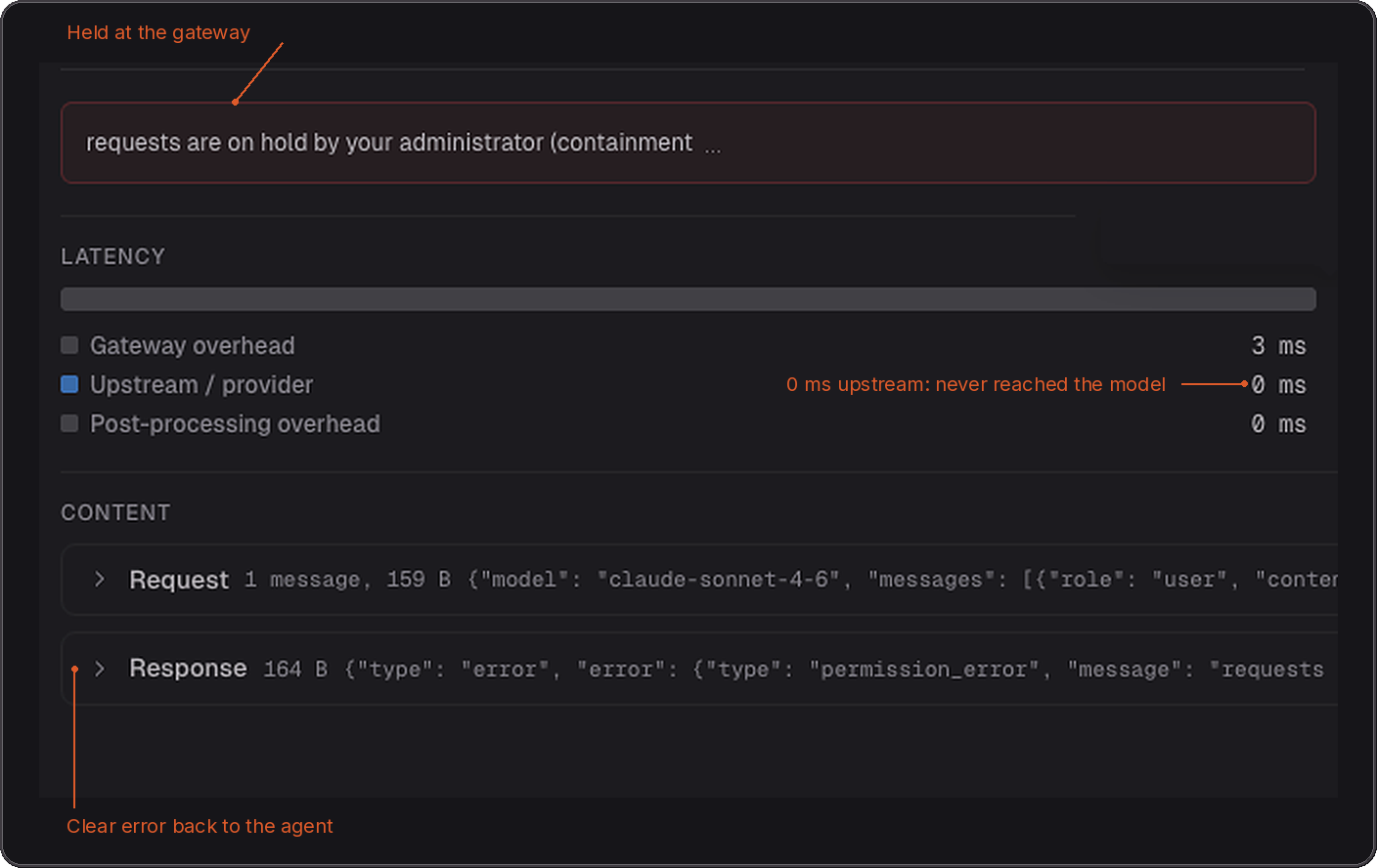
Once the hold is on, Agent 8’s next request is stopped at the gateway and never sent to a model. The other nine keep going.
Four hold targets, one control plane
Wingback containment holds sit above session-level throttle and terminate. Use them for a sustained stop, manual or automatic. They’re enforced on the gateway, the MCP path, the endpoint sensor and supported external gateways.
| Hold target | What stops | Business impact |
|---|---|---|
| Agent | Every request attributed to that agent | One agent paused. Everything else keeps running |
| Gateway profile | Every request on that profile’s credential | Every workload on the credential pauses, by design |
| Device | AI tool calls and prompts on one machine | One laptop’s local AI tools pause, whatever credential they use |
| Fleet (halt all agents) | Every attributed agent across the estate | Enterprise last resort when the blast radius is unknown |
When automatic rules are set to Enforce, they place holds through the same path as a manual admin hold. They start in dry run, so teams can see what would have been held before anything is held. Manual holds can run until someone releases them. Automatic holds always expire.
You get one kill switch with more precise targets. You don’t need a second product to evaluate.
A shared credential doesn’t tell you which agent is calling
A shared credential gets all ten agents onto the same path. It does not, by itself, tell you which of them sent a given request.
Wingback can still tell those agents apart, including your own agents and traffic that already comes through gateways you use, such as LiteLLM or Bifrost. When it can, a hold lands on the one agent that needs to stop, and the rest keep running on the same credential.
If it can’t tell them apart, an agent-level hold may not land where you expect. In that case, hold the shared path and accept that all ten pause, or get identity in place before the next incident.
Once Agent 8 is held, it stays held for the life of that hold, even though it still shares a credential with the others.
For the ten-agent setup, the practical choices are:
- Shared credential, per-agent stops. Each agent is distinguishable, so you can hold Agent 8 and leave the other nine serving.
- Shared credential, no time to work out who’s who. Hold the shared path and accept that all ten pause.
- One agent on its own credential. Every request on that path belongs to that agent. That’s useful for a high-risk workload, but it won’t give you nine separately stoppable agents on a shared key.
Manual and automatic holds at the same scope
Manual and automatic holds end in the same hold record and the same enforcement.
| Manual | Automatic | |
|---|---|---|
| Who triggers it | An admin, from the console, the API or a signed Slack action when enabled | A rule on enforcement blocks from the gateway or endpoint sensor |
| Typical use | Confirmed incident, legal hold, operator judgment | Repeated critical blocks, budget breaches, known exfiltration patterns |
| Expiry | Until released, or 15 minutes, 1 hour, 4 hours or 24 hours | Always expires. No indefinite automatic holds |
| Scope | The operator picks agent, profile, device or fleet | The rule takes its target from the finding, usually the agent, or the device when no agent is in scope |
The kill switch principles still hold. The stop lives outside the agent, it’s checked before the next meaningful action, and it’s audited. Granular containment adds a record of which target you stopped, not just that you stopped something.
Release without a fire drill
A hold pauses traffic and leaves the credentials in place.
When an admin releases a hold, or a chosen expiry such as four hours passes, traffic resumes on the same credential. Nobody rotates keys, redeploys agents or reissues profiles.
Security can pause Agent 8 while it investigates, and nine other teams don’t have to scramble through a key rotation.
The gateway and MCP path start refusing within seconds. Online endpoint sensors usually pick up a hold within a minute, and offline devices get it at their next check-in.
Where this sits in agent detection and response
There are three levels on the same runtime path:
- Session responses. Throttle, block one call or end one session. This is the everyday work of automatic containment.
- Scoped holds. Agent, profile or device, manual or rule-driven, until release or expiry. That’s this post.
- Fleet halt. On Enterprise plans, halt all agents when attribution fails or the blast radius is unknown.
The Agentic Kill Switch is still how you say “stop now.” Scoped holds mean you don’t have to reach for a fleet halt just because you can’t tell your agents apart.
How Wingback delivers scoped holds
Containment is part of Wingback’s Agent Detection & Response and AI Runtime Defense:
- Containment console. Manual holds, an impact preview before you commit, release and evidence export. Automatic rules and match events come with Enterprise plans.
- Gateway enforcement. Held LLM and MCP traffic is refused with a clear error that references the hold, so the SOC can trace it.
- Device holds. The native sensor blocks governed coding tools on one device. Use these alongside gateway holds when the problem is local.
- External gateways. Held agents are blocked on traffic that comes through gateways such as LiteLLM or Bifrost. Profile and device holds don’t apply on those paths, so contain at the vendor or on Wingback gateway traffic instead.
What to put on this quarter’s list
- Give every agent an identity before you need to stop one. Make sure each agent is distinguishable, including agents you run yourself and traffic that already flows through gateways such as LiteLLM or Bifrost. Pick one approach for each shared-credential setup and stick to it.
- Rehearse holding an agent versus holding a profile with security and platform teams in the room. The impact preview should show who would be affected over the next 24 hours.
- Run automatic rules in dry run until their targets match what you’d hold by hand, with the same scope and the same expiry habits.
- Write the release runbook. Confirm traffic resumes on the same credential, and that auditors get an evidence pack and session replay for the incident window.
- Keep device, profile and agent holds separate in incident playbooks. Pausing Agent 8 on the gateway won’t stop a local coding tool unless you also hold the device.
Sources and further reading
- VentureBeat Intelligence: VB Pulse Agentic Security and Identity Report, October 2026, on shared agent credentials and how fast enterprises can revoke an agent’s access
- OWASP Gen AI Security Project: OWASP Top 10 for Agentic Applications for 2026, ASI03 Identity and Privilege Abuse
- OWASP: AISVS C9, automated containment (9.3.8) and the manual kill switch (9.6)
- Wingback: Agentic Kill Switch and Automatic agent containment, parts 1 and 2 of this series
- Wingback: Platform capabilities and AI Runtime Defense
Talk with Wingback
If ten agents already share one credential, a useful kill switch has to know which of them is calling. We can walk through automatic rules and a scoped hold drill on your gateway path, without pausing the nine agents that behaved.
Request a demo and we’ll show how Wingback holds a single agent, profile or device on top of the automatic and emergency controls from parts 1 and 2.
Keep reading
- BlogAgentic Kill Switch: stop the next tool call before it landsAn agentic kill switch is a runtime emergency stop for AI agents: outside the model, checked before tool execution, and…
- BlogAutomatic agent containment: stop drift before you need the kill switchOWASP AISVS requires policy violations to trigger automated containment. How graduated responses (throttle, block, terminate)…
- BlogNVIDIA OpenShell and Wingback: securing agents at runtimeOpenShell governs what an AI agent can access. Wingback, connected through the OpenShell supervisor, checks what it sends to…
- GlossaryAgent Detection & Response (ADR)The practice of detecting and responding to threats from AI agents at runtime.
Platform
AI Runtime DefenseWingback sits inline at the inference path, correlating multi-signal detection into one response, sealing data on the wire, and replaying every session.