
Discover and trace every AI centric skill to application and human identities
Skills spread across Claude Code, Cursor and Codex faster than anyone tracks them. Find each one and trace it to its apps, services and people.
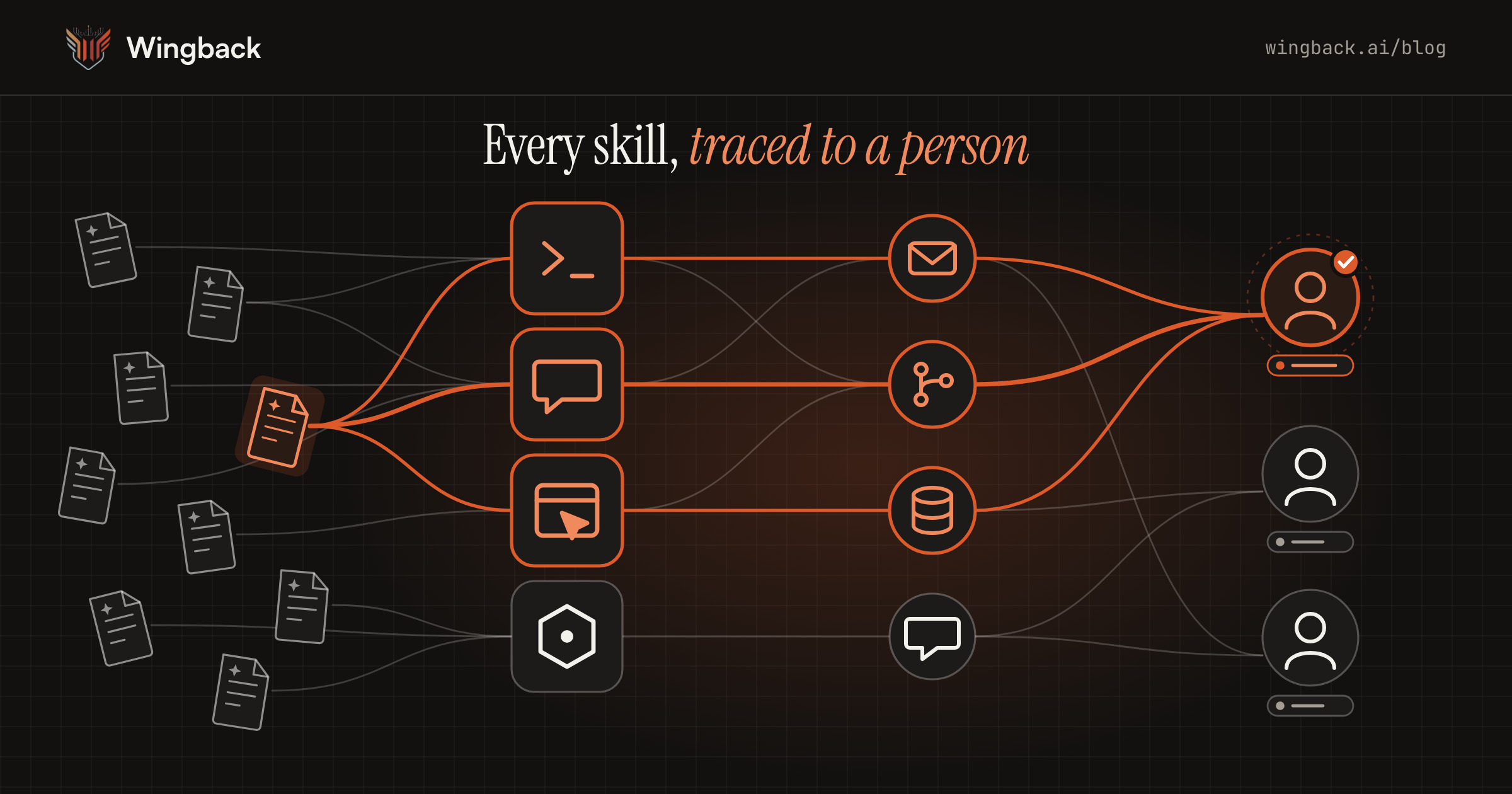
Somebody on your team wrote a skill last month. It tells an AI agent how to review a contract, run a database migration or format a board deck. It worked, so a colleague copied it. Then a third person dropped it into a different AI app.
Nobody filed a ticket for any of that, and no security tool was watching. You now have a piece of company know-how that agents follow, and you can’t say who owns it or where it runs.
This Field note is about that everyday sprawl. It leaves the attack stories to other posts and asks a plainer question: can you list your skills and name the person behind each one?
What an AI agent skill is
An agent skill is a folder that teaches an AI agent how to do one task. At minimum it holds a SKILL.md file with a name, a description and step-by-step instructions. It can also bundle scripts, templates and reference documents.
Anthropic introduced Agent Skills in October 2025 and describes them as folders of instructions, scripts and resources that Claude loads only when they’re relevant. In December 2025 it published the format as an open standard. The Agent Skills overview says it was developed by Anthropic and has since been adopted by a growing number of agent products.
The format has a property that matters to a business. An agent reads only the name and description of each skill when it starts. It loads the full instructions when a task matches. That keeps agents fast, and it also means a skill can sit unnoticed on a laptop for months and still change what an agent does the day it matches a task.
How skills spread across apps and laptops
Skills are popular because they are cheap to make. A teammate writes one in an afternoon, in a text file, with no review step. Then they travel.
The format is portable. Cursor’s skills documentation says it loads skills from its own folders, and from Claude and Codex folders as well. One skill saved for one tool can therefore show up in another without anyone copying it.
Skills also live in two kinds of place. Some sit in a project repository where teammates share them. Others sit in a user’s home folder, where Cursor’s docs note they stay on that machine until the user syncs or publishes them to a team. A skill in a home folder doesn’t go through a pull request.
People share them freely, too. Public skill marketplaces now host thousands of them. When Snyk scanned 3,984 skills from two marketplaces in February 2026, its ToxicSkills study found at least one security issue in 36.82% of them and a critical issue in 13.4%. Most of your sprawl won’t be malicious. Some of it will be unreviewed code and instructions that your agents trust by default.
The result is one skill used by several apps, on several machines, under several accounts.
The questions a business can’t answer today
When the CISO, an auditor or a customer asks about AI agents, four questions come up. Most teams can’t answer any of them for skills.
- Which skills exist? There’s no central list. Each app keeps its own folder on each laptop.
- Which apps load them? A skill in a shared folder may be read by three apps. The owner of one of those apps has no idea about the other two.
- Which services can they reach? A skill tells an agent what to do, and the agent’s other connectors decide what it can touch: your mail, your source code, your CRM.
- Which account is behind them? When something goes wrong, you need a name. Is it a corporate identity or a personal one?
The shadow AI inventory post covered the first step, which is knowing which AI tools and agents you run at all. Skills add a layer underneath. Even with every app approved, the instructions those apps follow can come from anywhere.
How Wingback answers them
Wingback’s endpoint discovery runs on managed laptops and finds the AI apps installed on them, including Claude Code, Claude Desktop, Codex CLI and Cursor. It also lists what each app loads, which covers skills, MCP connectors and plugins. You get one view across the fleet, and nobody has to fill in a spreadsheet.
Discover every skill
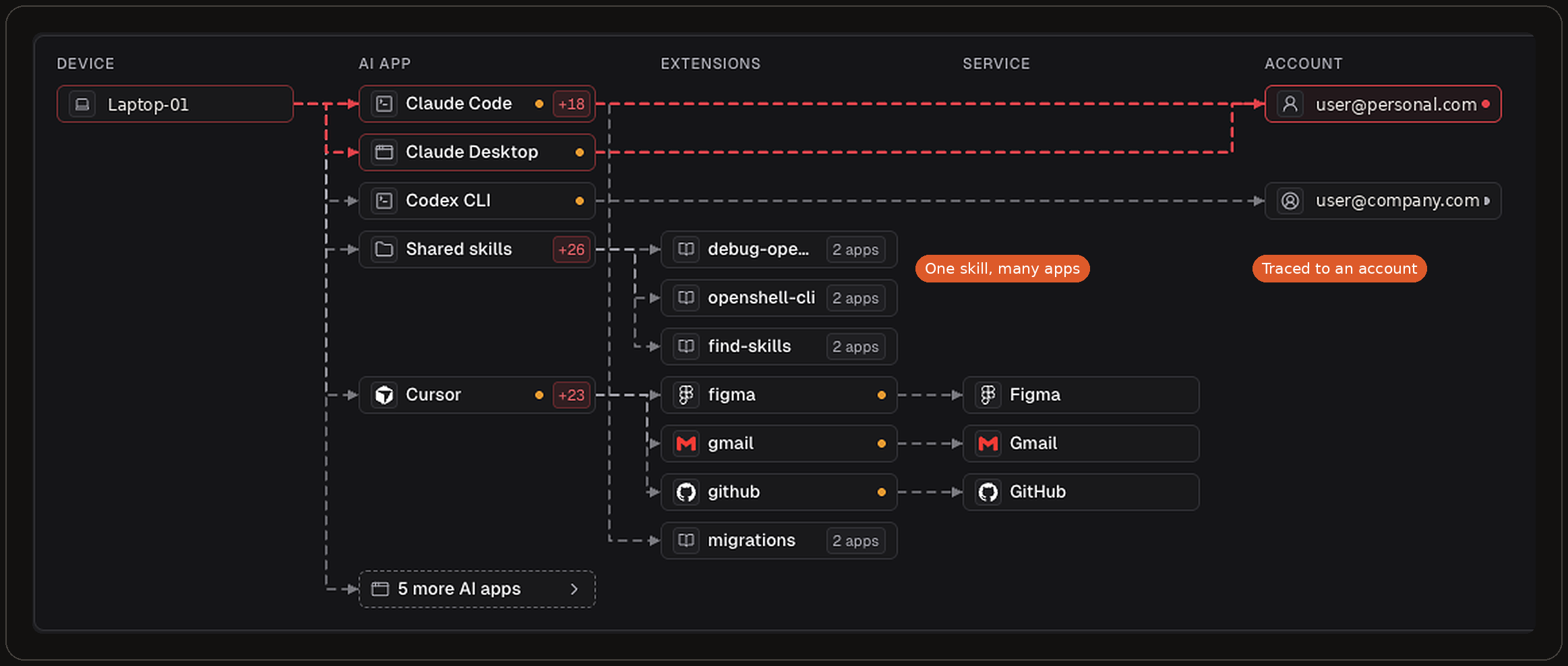
Each skill appears once, with the apps that load it attached. A shared skill stays one entry that several apps point to, and you don’t have to reconcile copies by hand. The same view shows the Shared skills group that builds up when apps read from a common folder, so you can see how far one skill has spread.
Trace each skill to an app, a service and an account
Discovery only helps if it ends at a person. Wingback links each item in a chain: device, AI app, the skill or connector it loads, the service behind it, and the account signed in to that app.
That chain answers the questions above in order:
- Pick a skill and you see the apps that load it.
- Each of those apps shows the services it can reach through its connectors, such as a design tool, a mailbox or a code host.
- Each app also shows the account in use, so you can tell a corporate login from a personal one.
Say a migration skill is loaded by three apps. Wingback shows those apps, the code host and mailbox they can reach, and the accounts signed in to them. You can answer “who is behind this skill?” in a minute instead of an afternoon of Slack messages.
Govern with the evidence in front of you
A list helps, but you also want to act on it. Wingback flags risky skills as findings you can triage, including skills that match known malicious patterns and skills that carry hidden instructions meant to steer the agent. Because it knows which apps and accounts a flagged skill touches, a finding arrives with its blast radius attached. A flagged skill loaded by three apps is a bigger problem than one used in a single sandbox.
On managed devices, Wingback can block a skill that is on a known-malicious list from loading at all. Enforcement decisions are recorded as findings tied to the device, so the audit trail is already there when someone asks for it.
Governance here stays proportionate. Most skills are fine and should stay available. The goal is to know what’s running, to concentrate review on the few risky ones, and to have a named owner for each.
A practical checklist
You can start before you buy anything.
- List the folders. Find where each AI app on your fleet reads skills from, and record them. Include the shared and home-folder locations.
- Pick an owner per skill. If a skill has no owner, either assign one or remove it.
- Separate corporate from personal accounts. Decide whether personal accounts may use skills that touch company data.
- Review skills that reach sensitive services. Start with the ones loaded by apps that also connect to mail, source code or customer data.
- Treat imported skills like imported software. Review a skill from a marketplace before it reaches a laptop, the same way you would a package.
- Re-check on a schedule. Skills change. A list from March is out of date by May.
Doing this by hand works for a small team. As the fleet grows it breaks down, because the folders keep changing and nobody has time to re-read them.
Sources
- Anthropic: Introducing Agent Skills, including the December 2025 update on organization-wide management and the open standard
- Agent Skills: Overview of the open format and its specification
- Cursor: Agent Skills documentation, on skill folders and cross-tool loading
- Snyk: ToxicSkills study of agent skills, February 2026
- Wingback: Shadow AI inventory before governance and AI discovery
Talk with Wingback
If you want to see which skills your team already runs, which apps load them and which accounts are behind them, we can walk through it on a sample fleet.
Request a demo and we’ll show you every skill traced to the person behind it.
Keep reading
- BlogYou cannot govern AI you have not inventoriedCSA’s research shows most AI tools and agents still run outside IT control. Why continuous AI inventory comes before runtime…
- BlogOne rogue agent in a shared-credential fleet: contain it, kill it, keep the rest runningWhen a fleet of AI agents shares credentials, you can contain the one that goes rogue, kill it if you need to, and keep every…
- BlogNVIDIA OpenShell and Wingback: securing agents at runtimeOpenShell governs what an AI agent can access. Wingback, connected through the OpenShell supervisor, checks what it sends to…
Platform
AI Surface IntelligenceWingback continuously maps the agents, models, MCP servers, and inference paths in your AI stack, scores each for risk, and routes findings to owners.